
Salesforce org monitoring
- 100 %
- inside your org
- 0
- outbound data by default
- 71
- controls self-assessed out of 255 catalogued
- 10 min
- to install
The French text governs. This page is the English version of Supervision FR.
38 capabilities answering a single question: is your org standing up right now, and since when? What the Discovery offer opens among them, at zero euros, with no Shield and not a single outbound call: 14.
- 38
- capabilities in this family
- 14
- active on installation day, on the Discovery offer
- Discovery
- entry tier of the family
What this family measures
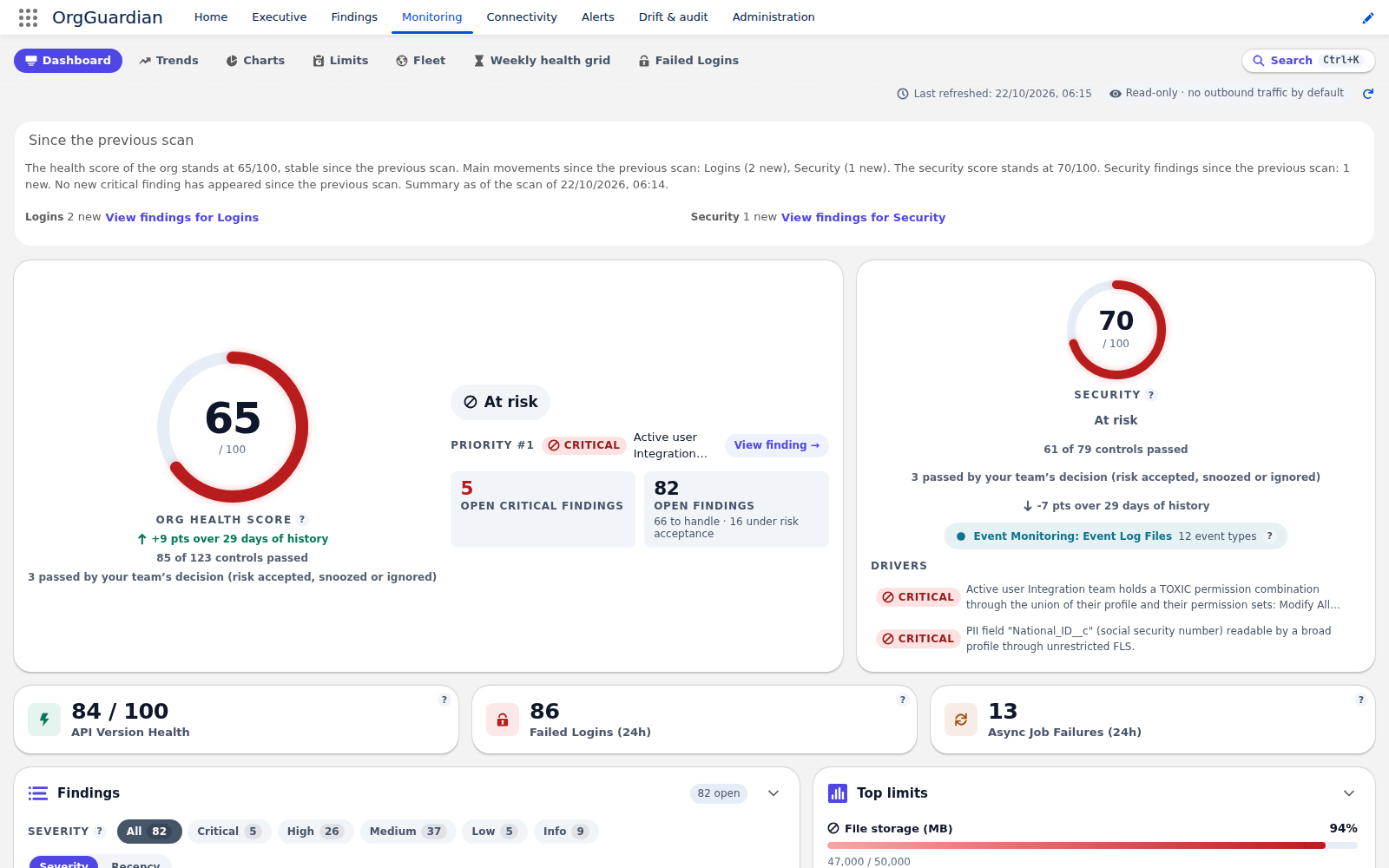
OrgGuardian's monitoring reads what the platform already exposes to an administrator and turns it into a series: platform limits and their consumption, org health score, failed logins, depth and failures of the asynchronous queues, API versions of components, and the inventory of the endpoints your org calls outside.
Every measurement carries a stable key, the one you will find again in the API and in the export:
Org:HealthScore, Monitoring:FailedLogins,
Monitoring:AsyncQueueDepth, Monitoring:UnhandledExceptions,
Callouts:PostureScore. A key does not change meaning between two versions: that is what
makes the series comparable over time, and that is the whole point of monitoring as opposed to a
screenshot.
The fourth block of the table below no longer observes the org: it observes the measurements already taken. Intra-org baseline, seasonality by hour band and weekday, correlation between findings, cohort benchmark. That is where the product stops saying “here is the value” and starts saying “here is the value, and it is abnormal for a Tuesday morning”.
The 38 capabilities, one by one
| Capability | Minimum offer | At install |
|---|---|---|
| The core, open from the Discovery offer | ||
Org limits monitoringMonitoring_Limits | Discovery | —, display tier: nothing to toggle, the offer is enough |
Scan narrativeScan_Narrative · “since the previous scan”: what moved — the health score, the open findings and the domain where they concentrate —, without attributing the score’s movement to a category | Discovery | Open |
Org health scoreMonitoring_HealthScore | Discovery | —, display tier: nothing to toggle, the offer is enough |
Health Check parity (SOQL, no outbound call)Health_Check_Parity · Health Check settings recomputed in SOQL alone, with no outbound call: hence open from install | Discovery | Open |
Failed-login monitoringMonitoring_FailedLogins | Discovery | —, display tier: nothing to toggle, the offer is enough |
Async performance / queueMonitoring_AsyncPerf | Discovery | —, display tier: nothing to toggle, the offer is enough |
API version postureMonitoring_ApiVersions | Discovery | —, display tier: nothing to toggle, the offer is enough |
Abandoned scheduled jobsMonitoring_OrphanJobs · looks at the org’s ENTIRE scheduled-job estate, not just the product’s twelve: a job in error, with no next fire, or that never fired at all | Discovery | Open |
Page experience, EPT without Event MonitoringMonitoring_PageExperience · EPT read from `LightningUsageByPageMetrics`, aggregated once a day — so WITHOUT the Event Monitoring add-on that the `EM_Ept` gate requires | Discovery | Open |
Event Monitoring probeMonitoring_EmProbe · measures the PRESENCE of Event Monitoring in the org, with no Shield licence | Discovery | —, display tier: nothing to toggle, the offer is enough |
System loggingSystem_Logging | Discovery | Open |
Time range controlTime_Range_Control | Discovery | Open |
Command paletteCommand_Palette | Discovery | Open |
| Outbound calls and their endpoints | ||
Callout + SOQL postureCallouts_SoqlPosture | Discovery | —, display tier: nothing to toggle, the offer is enough |
Endpoint registryEndpoint_Registry | Discovery | Closed |
Automatic endpoint promotionEndpoint_Auto_Promote | Any paid plan | Closed |
Endpoint SLAEndpoint_Sla | Any paid plan | Closed |
Endpoint status transition alertsEndpoint_Status_Alert | Any paid plan | Closed |
Endpoint health checkEndpoint_Health_Check · active probe: an outbound call goes to the endpoint you designate | Any paid plan | Closed |
Endpoint dependency graphEndpoint_Dependency_Graph | Any paid plan | Open |
Callout instrumentationCallout_Instrumentation | Any paid plan | Closed |
Silent callout failure detection (error inside an HTTP 200) (Callouts)Callout_Silent_Failures · reads your org’s own debug logs, self-call through a named credential, never the session token | Any paid plan | Closed |
Callout resilienceOutbound_Resilience | Any paid plan | Closed |
| Event Monitoring logs, and the supplements read through the REST API | ||
Event Monitoring ELF fetchEM_FETCH · requires a Shield / Event Monitoring licence on the Salesforce side; read through a self-call through a named credential, never the session token | Any paid plan | Closed |
EPT analysisEM_Ept · requires a Shield / Event Monitoring licence on the Salesforce side | Any paid plan | —, display tier: nothing to toggle, the offer is enough |
Slow-SOQL analysisEM_SlowSoql · requires a Shield / Event Monitoring licence on the Salesforce side | Any paid plan | —, display tier: nothing to toggle, the offer is enough |
Unhandled-exception ELFEM_UnhandledElf · requires a Shield / Event Monitoring licence on the Salesforce side | Any paid plan | —, display tier: nothing to toggle, the offer is enough |
Org limits REST supplement (Monitoring)ORG_LIMITS_SUPPLEMENT · self-call through a named credential, never the session token | Any paid plan | Closed |
Storage breakdown by objectMonitoring_Record_Count · self-call through a named credential, never the session token | Any paid plan | Closed |
| What the product infers from its own measurements | ||
In-org intelligence: baseline, anomaly, trendIntelligence | Any paid plan | Closed |
Seasonal baseline (by hour of day and day of week) (Intelligence)Intelligence_Seasonal | Any paid plan | Closed |
Saved adaptive threshold recommendationsIntelligence_AutoTune | Any paid plan | Closed |
Correlation engineCorrelation_Engine | Any paid plan | Closed |
SLA compliance over the score series (Monitoring)Org_Sla | Any paid plan | Closed |
Cohort posture benchmarkPosture_Benchmark · compared with your own cohort: the package ships none, and nothing shows without one | Any paid plan | Closed |
Posture narrativePosture_Narrative | Any paid plan | Closed |
Weekly health gridProm_WeeklyGrid | Any paid plan | —, display tier: nothing to toggle, the offer is enough |
Failed-login breakdownProm_FailedLoginBreakdown | Any paid plan | —, display tier: nothing to toggle, the offer is enough |
— display tier: nothing to toggle, the offer is enough
Source: read from the package code at the moment this page is built — FeatureGate.FEATURE_TIER for the offer, FeatureGate.CODE_DEFAULTS for the state at install, and for the label the full resolution of FeatureToggleAdminController: the enablement guide’s catalogue first, the GateLabels custom labels next, and failing that the technical name as is. The editor’s labels — the whole column, not just that fallback — ship in English: master language en_US, and the package carries no translation file: these are the exact strings your administrator reads in the feature editor, and the site build fails if any of these lists moves without the others. “Closed” does not mean absent: the capability is shipped, it is waiting for a human to open it inside the org — and a capability whose implementation nothing in the package can reach appears on none of these pages: the build drops it instead of selling it.
What this family does not do
- It fixes nothing. No capability on this page writes into your configuration: the product detects and advises, a human decides.
- It is not real time. The freshness of a measurement is that of the last scan, not of a continuous stream; a capability that could not measure says so in a finding instead of showing an old number.
- The four Event Monitoring detectors need a Shield licence on the Salesforce
side. Without it they stay silent — and the
Monitoring_EmProbeprobe tells you precisely whether your org has one. - It does not monitor your third-party systems. It measures what your org does towards them (calls, failures, endpoints), not what happens on their side.
The other families
Is this family in your offer? The grid says so line by line.
See the pricing grid Back to the seven families