
Health Check, Security Center, manual audit, OrgGuardian: what each one sees, and what none of them sees
These four do not replace one another: they do not look at the same plane. The useful question is not “which is best” but “which one sees what I need to see, and how often”.
- 100 %
- inside your org
- 0
- outbound data by default
- 71
- controls self-assessed out of 255 catalogued
- 10 min
- to install
What this page does not do
It compares no prices: Salesforce prices Shield and Security Center as a
percentage of your net spend with it (“30% of net spend” for Shield, “10% of
net spend” for Security Center, on salesforce.com/editions-pricing/platform/shield/,
read on 20 October 2026 and marked “provided for information purposes only and subject to
change”), while its Security Center page says “Pricing varies based on each customer's
individual needs”. A percentage of your contract does not compare with a per-user price. It rests on no benchmark
and no customer review: OrgGuardian has no public reference, and we will not
manufacture one. The two Salesforce products are described from their public documentation;
OrgGuardian from its own source code.
What does each of the four see?
Each row is a plane of observation, not a feature, and each cell takes only
three values. yes: the plane is covered. partial: one facet only, and
the caveat is spelled out in black and white in that tool's section below. no: no
coverage described for this plane — which states what we found, not what the tool would be
incapable of.
| Plane of observation | Health Check | Security Center | Manual audit | OrgGuardian |
|---|---|---|---|---|
| Session and password settings | yes1 | yes2 | yes | partial |
| Effective permissions per account, profile and permission sets combined | no | yes3 | yes | yes |
| Integration accounts with no second factor | no | partial4 | yes | yes |
| Connected apps: scopes and dormant tokens | no | partial5 | yes | yes |
| Guest access on Experience Cloud sites | partial6 | partial7 | yes | yes |
| Organization-wide sharing defaults (OWD) | partial8 | partial9 | yes | yes |
| Outbound integrations, endpoints and certificates | partial8 | partial10 | yes | partial |
| Remaining headroom on platform limits | no | no | yes | yes |
| Security and debt of the deployed Apex code | no | partial11 | yes | yes |
| Gap between two successive measurements | partial12 | yes4 | partial | yes |
| Article-by-article mapping to DORA / NIS2 | no | no | yes | partial |
| Several orgs in a single view | no | yes9 | yes | partial |
| Risk priced in euros | no | no | yes | yes |
| Deploying a security policy | partial1 | yes9 | yes | no |
Sources for the Health Check and Security Center columns
- trailhead.salesforce.com/content/learn/modules/security_basics/security_basics_healthcheck
- www.salesforce.com/platform/security-center/
- www.salesforce.com/platform/own-integration/
- trailhead.salesforce.com/content/learn/modules/security-center/gather-and-review-security-data
- www.salesforce.com/blog/simplify-security-visibility-with-security-center-essentials/
- resources.docs.salesforce.com/246/latest/en-us/sfdc/pdf/salesforce_winter24_release_notes.pdf
- resources.docs.salesforce.com/248/latest/en-us/sfdc/pdf/salesforce_spring24_release_notes.pdf
- help.salesforce.com/s/articleView?id=xcloud.security_health_check_score.htm
- trailhead.salesforce.com/content/learn/modules/security-center/learn-about-security-center
- help.salesforce.com/s/articleView?id=xcloud.security_center_metrics_reference.htm
- www.salesforce.com/blog/security-mesh/
- help.salesforce.com/s/articleView?id=xcloud.security_health_check_notifications.htm
A “no” carries no source: it says no coverage is described, not that the tool would be incapable — one does not cite a page to prove an absence.
Two readings jump out, and they cut both ways. The manual audit column is
almost full: a competent human, given enough time, has virtually no blind spot of
capability. And the last row is the only one where OrgGuardian says no
when Security Center says yes — that is deliberate, and it is explained below.
Health Check: the only source on settings
The native Health Check scores session and password settings against a baseline, across four risk levels, and accepts custom baselines if your internal standard differs from Salesforce's. It is included, it does not have to be installed, and it reads in a minute. Health Check (Salesforce Help).
It does not only read. Its “Fix Risks” button updates several security
settings in a single action, against the chosen baseline — not all of them: Salesforce states
that some cannot be changed with this button. That is why it
earns a partial on the “deploying a security policy” row, and the caveat fits in
one sentence: it applies a baseline inside one org, where Security Center pushes a
policy to a fleet.
Configure Health Check (Salesforce workshop).
On that particular plane, it remains the reference. Minimum password length,
expiry, session timeout, locking sessions to the IP address, forced re-authentication,
clickjack protection, trusted IP ranges: these settings are not exposed to a SOQL query. They
are read through the Tooling API, a call to the org itself that OrgGuardian keeps
closed by default. Once the administrator has connected the
OS_SelfOrg named credential to their org (org address and the credentials of a
client app) and turned on Tooling API discovery, OrgGuardian reads Health Check itself: its
score, its active baseline and the verdict on each of its settings, and it flags a drop in the
score. That setup is open to every offer, the free Discovery one included:
Salesforce publishes Health Check for free, so we do not charge for the path that reads it.
Without that access OrgGuardian recomputes only four of them, in SOQL, with no configuration
and from the first scan, the free Discovery offer included: the share
of System Administrators among active internal users, the objects guest user profiles can read
and the objects they can edit, and the objects whose default external access is public.
Its limit is one of scope, not of quality: it looks at neither effective permissions, nor
connected apps, nor code; of outbound integrations it sees only certificates and remote sites. A
Health Check score of 90% is compatible with an integration account that combines
Modify All Data and an API with no MFA. It is no longer quite point-in-time: since
15 April 2026, Salesforce notifies System Administrators of production orgs by default,
every week, when the score drops. The notification covers the overall score; the 30-day score trend, and the settings that weighed on a given day's score, can be read for free in Security Center Essentials (see below).
Health Check notifications (Salesforce Help, read on 22 October 2026).
The four reservations behind a “partial” rather than a “no”
— re-read on 22 October 2026. Gap between two measurements: the weekly
notification of a score drop, on by default since 15 April 2026, compares one overall
score from one week to the next; the 30-day trend and the per-setting detail belong to Security Center Essentials — hence partial for Health Check itself. Outbound integrations and certificates:
Health Check scores expired certificates, key size and certificate expiration, as well as
remote sites with Disable Protocol Security selected. It sees neither named
credentials, nor external services, nor the calls actually made — hence partial. Guest access: since Winter ’24, Health Check exposes two
settings named Number of Objects to which Guest User Profiles have Read Access and
… Edit Access. It counts exposed objects; it names neither the site, nor the profile,
nor the record — hence partial. Organization-wide defaults (OWD): Health Check
does carry a check, Number of Objects with Default External Access Set to Public, rated
high risk. Again it is a count of objects, not the sharing matrix: neither the role hierarchy,
nor sharing rules, nor manual sharing. Verified outside the documentation, by a read-only
Tooling API query on our own org: SELECT RiskType, SettingGroup, Setting FROM
SecurityHealthCheckRisks.
Security Center: the fleet, and the policy you push
Security Center aggregates the security of several orgs into a single view: child orgs report their data up to a parent org. That is its reason for existing, and on that ground it is more direct than OrgGuardian. It exposes more than eighty security and governance metrics — authentication and MFA, permission assignments, installed packages, connected apps and external client apps, certificates, licence usage, encryption, mobile and Transaction Security policies, Agentforce agents and MCP servers (in beta), Health Check data, and your own custom metrics — with customisable notifications when one of them moves. Security Center (Salesforce Help).
Two capabilities deserve to be named without being played down. The first: effective
permissions. Since Own Secure was folded in, the subscription includes an extension
(Security Center Extension, a managed package to install) whose Who Sees What
explorer details, for a user, their access to every object and field, their system permissions
and the reason for each — profiles, permission sets and permission set groups, sharing rules,
role hierarchy. Salesforce writes: “viewing permissions for any user across any org”
(salesforce.com/platform/own-integration/, read on 22 October 2026). It also shows
when a user gains or loses a permission. The second: it deploys a policy — session
timeouts, trusted IP ranges, password settings, Health Check baseline — to the orgs concerned.
That second capability is the one OrgGuardian will not have. Security Center acts — its product
page says so: “Take critical actions based on agentic recommendations, like freezing user
accounts, resetting passwords, and more” (salesforce.com/platform/security-center/,
read on 22 October 2026); OrgGuardian observes and documents. That security agent (Security
Center with Agentforce) requires, according to Trailhead, Security Center and Event
Monitoring set up plus an Agentforce Platform add-on subscription; Salesforce Help still labels
it beta. If what you need is to enforce a configuration standard across
a fleet of orgs, Salesforce's tool is the one that does it, and no comparison page will change
that.
What we did not find described in its public documentation, re-read on 22 October 2026:
monitoring of named credentials, external services and the calls actually made; a measure of
code debt — it does not analyse code itself, but since 14 September 2026 Security
Mesh, built on Data 360, ingests DigitSec results into it under a third-party subscription;
article-by-article mapping to DORA or NIS2, which Salesforce cites as context for centralised
alerting with no mapping; risk priced in euros — it rates risk from 0 to 4, with no amount; and
remaining headroom on platform limits — it tracks licence usage and accepts your custom metrics,
but does not describe limit consumption. Hence the no and the partials in its
column, in the sense this table gives those words: no coverage described, not an incapacity. It is a licensed product, priced as a percentage of your Salesforce spend; we do not compare that price.
The reservations in its column, re-read on 22 October 2026 — they hold the partials, and the re-reading raised four cells of this table (effective permissions, sharing defaults, code, and the gap between two measurements on the Health Check side). Integration accounts with no MFA: the No MFA, API Only User Access and MFA & OAuth metrics exist and are tracked separately; crossing them on integration accounts is not described. Connected apps: the inventory (which apps, installed by whom, when), external client apps and an alert when one is added are described; neither OAuth scopes nor dormant tokens. Guest access: Health Check's counts of exposed objects per org, guest anomalies from Threat Detection (with Event Monitoring) and any profile's access through the extension; neither a per-site view nor a dedicated reading of guest profiles. Sharing defaults: it relays each org's Health Check control and explains a user's access to a record; no object-by-object view of the defaults. Outbound integrations and certificates: certificates, insecure remote sites and suspicious MCP server URLs (in beta) are described; neither named credentials, nor external services, nor the calls made. Code: DigitSec results, ingested through Security Mesh; no debt measure.
And Security Center Essentials, free since July 2026?
Since July 2026 Salesforce has offered Security Center Essentials, a foundational version of Security Center “at no additional cost”. It covers a single org and seven metrics: Health Check score and baselines, connected apps, managed and unmanaged packages, trusted and login IP ranges. Data is collected weekly, can be refreshed on demand, and is kept for 30 days; multi-org, more metrics and custom security policies stay with licensed Security Center. A divergence we would rather write down: Trailhead and Salesforce Help say all editions; the 15 July 2026 announcement says Enterprise, Unlimited and Performance; and Trailhead also mentions “permission metrics”, which the announcement and Help do not list. Salesforce announcement, 15 July 2026 · Trailhead, read on 22 October 2026.
Against OrgGuardian's Discovery offer, the difference is scope and pace: Essentials shows seven configuration metrics, collected weekly; Discovery scans health, limits and a security core (accounts without MFA, guests, public links, OAuth apps, Modify All Data / View All Data holders) every hour. Essentials keeps 30 days of history, Discovery 7. The two complement each other: nothing stops you running both.
Another free tool appeared in January 2026: ForceGuard AI: Security Auditor, published by Salesforce Labs on AppExchange. It is an Agentforce agent shipped as an unmanaged package that “requires Agentforce to be enabled in your Salesforce org”: A–F security grades, record access paths, permission sources, user and profile comparison. Free to install, it runs on Agentforce, billed in credits, conversations or per user; Salesforce Labs describes its apps as “not official salesforce.com products”. AppExchange listing, read on 22 October 2026.
The manual audit: the only one of the four with judgement
A human auditor is the only one who can ask why a permission exists. They call the person who granted it, they learn that the account serves a quarterly billing flow, and they decide. No tool does that. They are also the only one who sees what lives outside the org: the middleware, the data warehouse, the workstation where the export landed.
Their blind spot is therefore not coverage, it is the calendar. The effective permission of an account is the sum of its profile and of every permission set assigned to it, and that sum changes between two reviews. On an org of a few hundred users, a serious review is counted in days — and it is out of date the next day. The cartesian product profiles × permission sets × users exceeds what a quarterly review can cover.
This is why the right question is never “tool or human”: the first pass is done perfectly well by hand, it is the repetition that calls for tooling.
OrgGuardian: the planes it measures, and those it does not
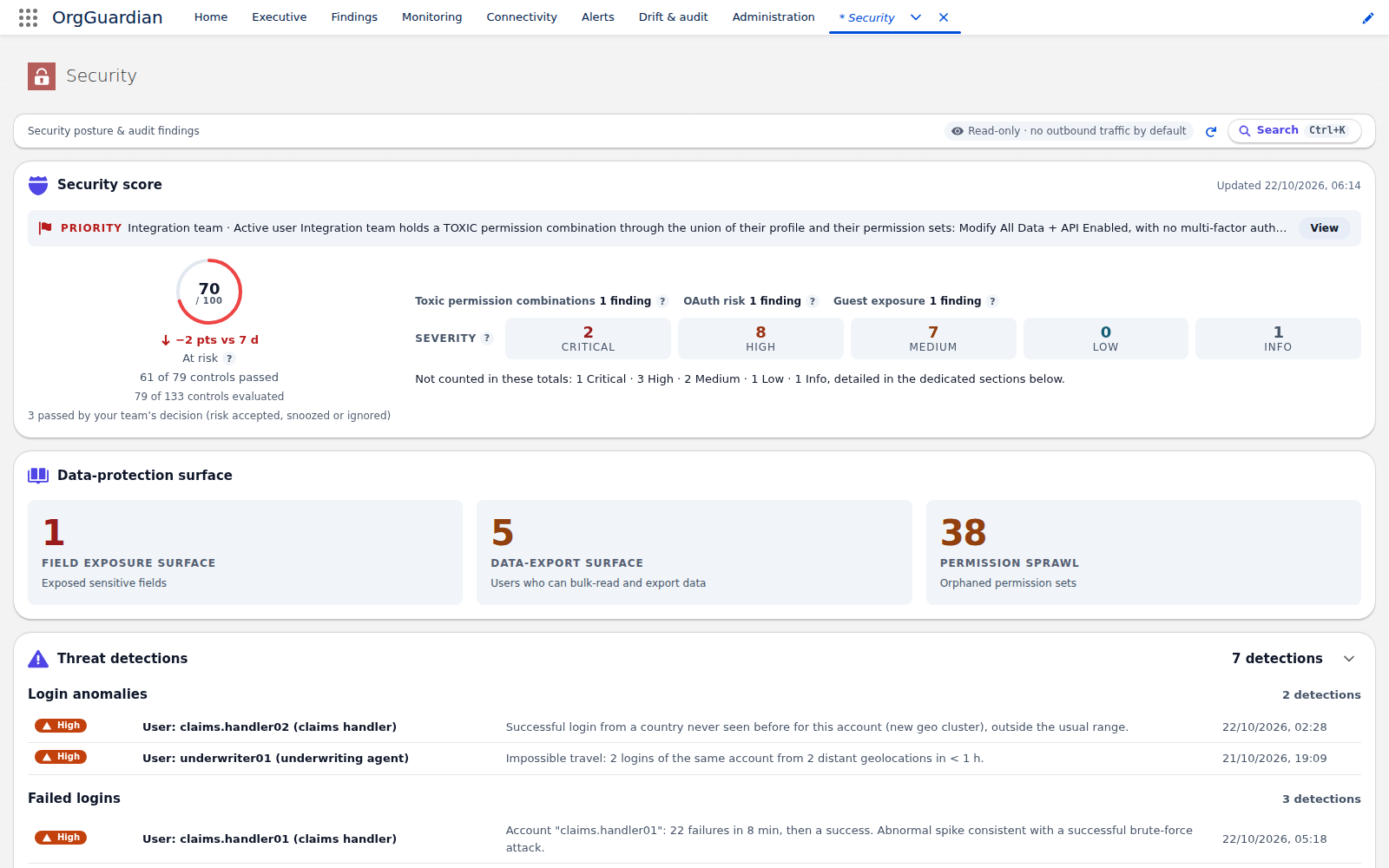
OrgGuardian installs into the org and measures what is queryable from Apex. Concretely, and this is verifiable in its code: the effective permission of every active user, computed as the union of their profile and of every permission set assigned, with escalation detection between two scans; the accounts — human and integration alike — not covered by a permission enforcing MFA; connected apps with their scopes, their usage volume and the date their tokens were last used; the object permissions actually carried by each Experience Cloud guest profile; the sharing defaults that expose records for read or for write, internally as well as externally; named credentials and CSP trusted sites; the headroom on platform limits; risky administrative actions over the last seven days; configuration drift by fingerprint between two measurements; and the security postures of every first-party Apex source — classes and triggers alike — with a debt score derived from them.
Everything above is read by a plain query, without a single outbound call, and with no configuration to set up: no credential to create, no connector to authorize.
A clarification we would rather write than let you discover. This security
pack is included in full in any paid plan. On the
Discovery offer — the free one, the one you install to evaluate — it runs for a core of five
families: accounts without MFA, guest exposure, public file links, connected apps and OAuth
tokens, holders of Modify All Data and View All Data. Health Check adds to it in two ways. The
first needs no configuration: the four settings
recomputed in SOQL (share of System Administrators, objects guest users can read and edit,
public default external access) run from the first scan. The second needs an administrator
setup, without changing offer: connect the OS_SelfOrg named credential to the org
(address and the credentials of a client app), then turn on Tooling API discovery. OrgGuardian
then reads Health Check itself — its score, its active baseline and the verdict on each of its
settings — on the Discovery offer too. What the Discovery offer shows with
nothing to configure — once the 30-day trial armed by the first opening of the console ends — is
monitoring, platform limits, the endpoint inventory, this security core and those four
settings. The list above therefore describes what the product CAN do, not what a free
installation displays: ask for access if you want to evaluate it on your org.
What it does not do — the complete list
- It never remediates. This is a design posture, not an incomplete version 1. A remediation takes the form of a business-impact statement, a risk level for the change, numbered steps and a link to the right Setup screen. The action stays human, end to end.
-
It does not read session and password settings without Tooling access.
Password length and expiry, session timeout, locking to IP, re-authentication, HttpOnly,
clickjacking, SMS identity confirmation, trusted IP ranges: these settings are not exposed to
SOQL. OrgGuardian reads them through the Tooling API, behind a gate that is closed by default
and the
OS_SelfOrgnamed credential to configure; while it is closed, it does not measure them. And once it is open, it is still Health Check's own verdict that it reads back: the simplest reason to keep both. - It does not see what leaves the org. It sees the declared endpoint and the OAuth scope granted. It does not see the system on the other side, nor what that system does with the data once the data has arrived there.
- A large part of the outbound inventory is switched off on delivery. Remote Site Settings, External Services, outbound messages, external credentials, certificate expiry dates, endpoint probing: none of these objects is exposed to a query. They require the Tooling API, which is to say an outbound call to your own org. These detectors exist, they sit behind switches, and those switches are off by default so that a standard installation produces no outbound traffic. Turning them on is an administrator's decision, not a factory setting.
- The Apex code analysis is a pattern detector, not a static analyser. It reads every first-party class and trigger, spots the security postures missing from the deployed code and measures debt. It does not prove the absence of a logic flaw: it recognises shapes, it does not follow a value through a call graph. That is a limit of depth, not of scope — a human reading the same code sees things it will not.
- Regulatory mapping is not a guarantee of compliance. 100 mappings out of 126, across all frameworks taken together, are declared partial: they observe only the facet named by their evidence. The scope of each mapping is displayed in the product.
- Multi-org aggregation is an option, not the default mode. It is reserved for the top tier, disabled at installation, and requires one cross-org named credential per linked org. Security Center starts there; OrgGuardian gets there.
- Two languages only. Finding messages are stored in English, the language the product ships in, and a language pack recomposes them in French at display time: it is the only other language shipped. A sentence translates all or nothing: if a fragment is missing, the English sentence comes out as stored.
And Shield? What it encrypts, what it logs
Shield is not a fifth competitor, and that is why it is missing from most comparisons: it does not
answer the same question. The four tools above say what state the configuration is in.
Shield — four products sold together, “Event Monitoring, Field Audit Trail, Platform Encryption,
and Data Detect in one suite” according to its pricing page, read on 20 October 2026 — acts on
the data itself: Platform Encryption encrypts it at rest, Event
Monitoring logs who did what (logins, report exports, API calls, queries), Field
Audit Trail keeps field history for up to ten years, and Data Detect finds
sensitive data. None of the four says that an integration profile combines
Modify All Data and an API without MFA; and without the Event Monitoring logs, none of
the tools compared above says who exported a report last night — OrgGuardian reads it when the
license is there, since version 1.0.0.5.
The question actually being asked — “we have been quoted Shield, do we need both?”
— has a short answer: they do not replace each other, and one enriches the other. Without Event
Monitoring, OrgGuardian infers bulk export from a capability (the right to do it). With the
license (Shield or the Event Monitoring add-on), it observes it: since version 1.0.0.5,
the Event Monitoring security events feature, closed at install and turned on by an administrator on any paid plan, reads inside the org report exports, Bulk API 2.0 jobs, Login As
sessions and Threat Detection anomalies over the last seven days, and names the user, the volume
and the origin network. Two Setup steps come first: the View Real-Time Event Monitoring Data
permission for the user who runs the scan, and storage for these events in Event Manager. Without
the license it reads nothing; a family with no event at all is declared not measured,
never “nothing to report”. The log detectors — abnormal logins, slow queries, unhandled errors —
are a separate option, disabled at install and included in any paid plan:
they read the log files through your own org's API, a call from the org to itself that needs the
OS_SelfOrg connection wired. Nothing goes to a third party.
What settles the budget question is the risk you carry. An obligation to encrypt at rest or to retain field history is met with Shield (Platform Encryption, Field Audit Trail): OrgGuardian encrypts nothing and does not retain your field history. An over-privileged integration profile, a dormant OAuth token, a guest site exposing an object call for a configuration measurement: we did not find one in Shield's public documentation, which logs what happens rather than stating how the org is set. Shield is priced as a percentage of your Salesforce spend (see above); we will not make it a table column.
What does none of the four see?
The honest part of a comparison is the part where all four columns are empty.
- Intent. A permission legitimately used and the same permission misused have exactly the same signature in the configuration. None of the four tells them apart.
- The data once it has left. An export may leave an administrative trace. What happens to the file afterwards — where it is dropped, who reopens it, how long it stays — no longer belongs to the org, and escapes all four.
- The other side of the integration. The org knows that it calls an endpoint. It does not know who operates it, nor whether that system is itself kept in order.
- The business criticality of a field. That a column carries contractually sensitive data is a piece of information that has to be declared. It cannot be deduced from any metadata.
- Compliance itself. All four produce facts. The compliance verdict remains a judgement, made by a person who puts their own responsibility on the line.
How do you choose? One sentence per case
If you want to know where you stand on settings: Health Check, tonight, with nothing to install and nothing to buy. If you run a fleet of orgs and want to enforce a common standard across it: Security Center. If you have to understand one particular situation, with context and with people to question: a manual audit, and nothing else. If the problem is that the measurement does not repeat often enough, that it reaches neither effective permissions nor integrations nor code, and that it has to be presented to an auditor: that is OrgGuardian's ground.
Should you uninstall Health Check if you install OrgGuardian?
The question does not arise — Health Check is native, it is neither installed nor uninstalled. And it remains the reference on settings: once Tooling access is connected, OrgGuardian reads its score and its verdicts instead of recomputing them; without that access, it recomputes only four of them.
Do Security Center and OrgGuardian overlap?
Yes, and more so since 2026. On effective permissions, Security Center and its extension go as far as OrgGuardian; on connected apps and drift, in part; on certificates and code, in part too, code through DigitSec results under a third-party subscription. Not on monitoring outbound calls, article-by-article regulatory mapping, or pricing the risk in euros. And not at all on the nature of the tool: one deploys a policy, the other stays read-only.
Author
Stéphane Berthoz
Builds and maintains OrgGuardian, the Salesforce managed package published by DOPAMINE SAS. Everything described here comes from building the tool, not from reading about it.